


Download Writer2ePub – free eBook conversion tool for Windows
Overview of Writer2ePub
Writer2ePub is a lightweight, GPL‑licensed utility that turns OpenOffice Writer documents into fully‑featured ePub e‑books. Designed exclusively for Windows, the program supports Windows XP and older versions, making it an ideal solution for users who still rely on legacy systems. Since its introduction in 2011, Writer2ePub has amassed over 26,000 downloads, a testament to its reliability and the niche it fills in the Home & Hobby – eBooks → Creators category. The current stable build, version 1.1.10, was last updated on June 29 2011 and is available in English, Spanish, and German. Whether you are a novelist looking to self‑publish, a teacher preparing interactive textbooks, or a hobbyist converting personal essays into portable e‑books, Writer2ePub offers a straightforward, no‑cost pathway from a familiar word processor to a widely compatible ePub file.
The application’s small footprint means it won’t burden your hard drive with unnecessary bloat, and because it runs as a plug‑in for OpenOffice Writer, you can stay within the same editing environment you already trust. The conversion process respects most of the formatting you applied—headings, tables, images, and even footnotes—so the resulting ePub looks polished on e‑readers, tablets, and smartphones. Moreover, the tool is completely free, eliminating the need for costly commercial converters while still delivering a secure, open‑source solution. If you need an easy way to publish your manuscript, course material, or collection of short stories without learning the intricacies of ePub XML, Writer2ePub is the answer.
Key Features and Functionalities
- Direct integration with OpenOffice Writer – convert documents with a single click.
- Full support for OpenOffice styling, including headings, lists, tables, and images.
- Automatic generation of a table of contents based on document headings.
- Preserves footnotes and endnotes, ensuring academic and reference material stays intact.
- Multi‑language interface (English, Spanish, German) for broader accessibility.
- Lightweight installer – requires less than 10 MB of disk space.
- GPL‑licensed, meaning you can modify or redistribute the software under the same terms.
- Compatible with Windows XP, Windows 2000, and earlier Windows versions.
- Export to standard ePub 2.0 format, which is widely supported by Kindle, Nook, Apple Books, and most Android/iOS e‑readers.
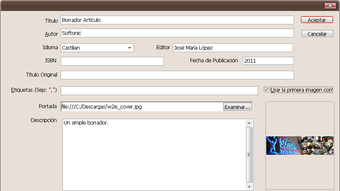
- Simple, wizard‑style UI that guides you through metadata entry (title, author, publisher, ISBN).
Writer2ePub’s feature set may appear modest compared to premium commercial converters, but its focus on core conversion tasks makes it remarkably dependable. The automatic table of contents generation leverages the hierarchical structure of your OpenOffice document, sparing you from manually creating navigation files. Metadata entry is optional but highly recommended, as it enhances the discoverability of your e‑book in online stores and library catalogs. Additionally, the software’s open‑source nature invites community contributions, meaning bug fixes and minor enhancements continue to appear even after the last official update. For users who value transparency, security, and a no‑frills conversion experience, these features combine to deliver a compelling package.
Another noteworthy aspect is the handling of embedded images. Writer2ePub extracts image files from the original document, optimizes them for ePub standards, and embeds them directly into the final file, preserving resolution and layout. This is particularly valuable for picture‑heavy publications such as cookbooks or children's storybooks. While the tool does not support DRM encryption, the resulting ePub remains fully editable, giving authors the flexibility to make post‑conversion tweaks using any ePub editor if desired.
Installation, Setup, and Everyday Use
Step‑by‑Step Installation
1. Download the installer from the official website or a trusted software repository. The file is named Writer2ePub-1.1.10.exe and is approximately 8 MB in size.
2.
Run the executable. Because the program is signed with a GPL certificate, Windows may prompt you to confirm that you trust the source—click “Run” to continue.
3. Follow the wizard.
Accept the license agreement, choose an installation folder (the default location in C:\Program Files\Writer2ePub works well), and let the installer copy the necessary files.
4. Complete the setup. After installation, a shortcut appears in the Start Menu under “OpenOffice → Writer2ePub”.
The plug‑in also registers itself within OpenOffice Writer’s “Extensions” panel, making it instantly available for conversion.
First Conversion – A Practical Walkthrough
1. Open your document in OpenOffice Writer. Ensure that headings use the built‑in “Heading 1”, “Heading 2”, etc., styles, as these drive the ePub’s navigation.
2.
Launch Writer2ePub via the “Tools → Extensions → Writer2ePub” menu. The conversion window appears, displaying fields for title, author, language, and optional ISBN.
3. Enter metadata.
While optional, filling these fields improves how e‑readers display your book’s details.
4. Choose output location. By default, the ePub is saved in the same folder as the source document, but you can browse to any directory you prefer.
5.
Click “Convert”. Writer2ePub processes the file, embeds images, builds the navigation, and generates an ePub file.
6. Validate the result.
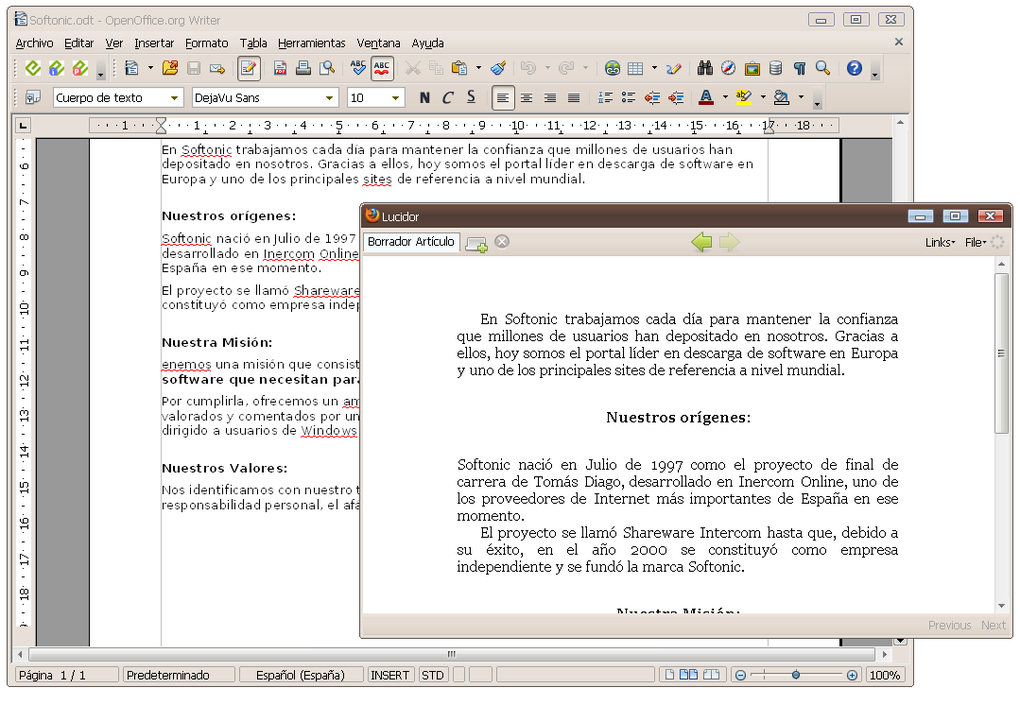
Open the ePub in a reader app such as Calibre, Adobe Digital Editions, or directly on your Kindle to confirm formatting, table of contents, and image placement.
The entire process typically takes less than a minute for a 100‑page manuscript, making it an efficient workflow for authors who need to produce multiple ePub versions quickly. Because the tool works offline, there are no privacy concerns related to uploading your manuscript to cloud services. Updates, although infrequent, can be applied by downloading the newer installer and running it over the existing installation.
Compatibility, Pros & Cons, and User Feedback
Operating System Compatibility
Writer2ePub is built for Windows platforms dating back to Windows XP, Windows 2000, and even earlier releases. It runs smoothly on both 32‑bit and 64‑bit architectures, though the installer itself is a 32‑bit package, which ensures broader compatibility. Users on modern Windows 10 or Windows 11 can still install and run the program via compatibility mode if they encounter any legacy DLL warnings. Because the software is a plug‑in for OpenOffice Writer, you must have a compatible version of OpenOffice (typically 3.x or newer) installed on your system. The application does not support macOS, Linux, Android, or iOS natively; however, Linux users can run it through Wine if they wish to experiment.
Pros
- Completely free and open‑source – no hidden fees or trial limitations.
- Lightweight installer, low disk footprint.
- Seamless integration with OpenOffice Writer, eliminating the need for file export/import steps.
- Preserves most formatting, including images, tables, and footnotes.
- Automatic table of contents generation based on heading hierarchy.
- Multi‑language interface expands accessibility.
- Works on legacy Windows versions, ideal for older hardware.
Cons
- No native support for macOS, Linux, Android, or iOS.
- Last official update was in 2011; occasional compatibility quirks on newer Windows releases.
- Lacks advanced ePub features such as DRM, complex CSS styling, or interactive media embedding.
- Does not provide direct publishing to e‑book stores; users must upload the resulting ePub manually.
- Limited to OpenOffice Writer – not compatible with Microsoft Word or LibreOffice out of the box.
Overall Rating: 4 out of 5 stars
Writer2ePub shines as a no‑cost, reliable bridge between OpenOffice Writer and the ePub ecosystem. Its simplicity is both a strength and a limitation; while power users may miss advanced formatting controls, the majority of hobbyist authors will appreciate the straightforward workflow. The primary drawback remains its aging codebase, which may require compatibility tweaks on the newest Windows releases. Nevertheless, for anyone looking to convert manuscripts into clean ePub files without a steep learning curve or financial commitment, Writer2ePub remains a solid choice.
Frequently Asked Questions (FAQ)
Can Writer2ePub convert Microsoft Word documents?
Writer2ePub works exclusively as an OpenOffice Writer extension, so you must first open your Word file in OpenOffice (or LibreOffice) and save it as an .odt document before conversion.
Is the generated ePub compatible with Kindle devices?
Kindle supports MOBI and AZW formats natively, but you can easily convert the ePub produced by Writer2ePub to Kindle format using free tools like Calibre.
Do I need an internet connection to use Writer2ePub?
No. Writer2ePub is a completely offline tool. After installing the program, all conversions happen locally on your computer.
Can I add DRM protection to the ePub?
Writer2ePub does not include DRM features. If you need DRM, you must apply it after conversion with a separate service or e‑book publishing platform.
Is there a way to customize the CSS of the output ePub?
The tool uses a basic default stylesheet. For advanced styling, you can open the generated ePub in an editor like Sigil and modify the CSS manually.
Conclusion & Call to Action
Writer2ePub remains a valuable, free solution for anyone who writes in OpenOffice Writer and wants to reach readers across e‑book platforms. Its low‑memory footprint, straightforward conversion process, and open‑source licensing make it especially appealing for hobbyists, educators, and independent authors who prefer a cost‑free workflow. While it lacks some of the bells and whistles of modern commercial converters, its core functionality is robust, and the ability to produce a clean ePub file in seconds outweighs the limitations for most casual users.
Ready to transform your manuscripts into ePub books? Download Writer2ePub now and start converting today. Remember to keep a backup of your original .odt files, and enjoy the freedom of publishing without any subscription fees.







